
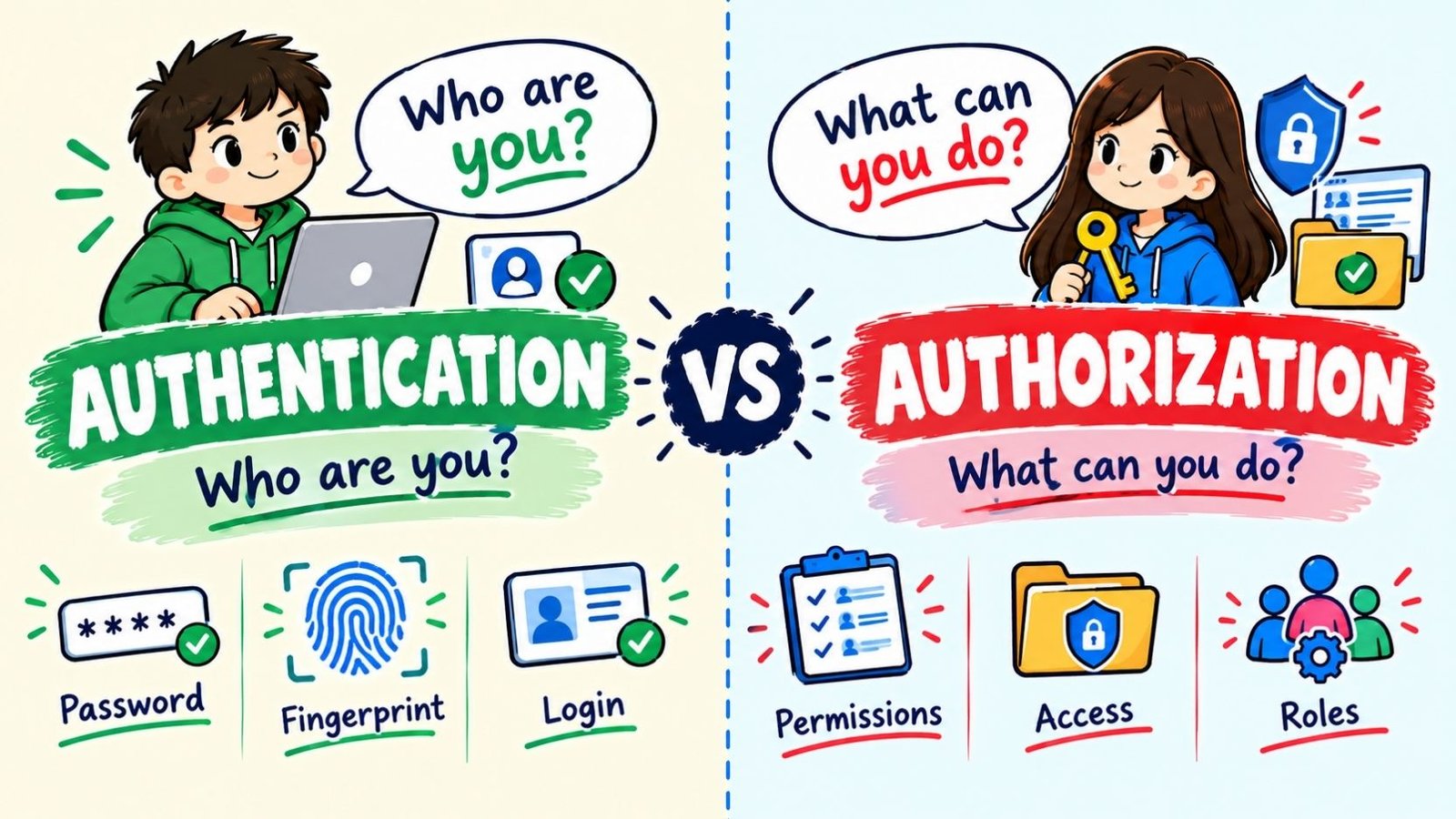
Authentication and authorization are two separate steps that decide who can use a system and what they can do inside it. Authentication checks your identity, while authorization checks your permissions. The two words sound alike and often happen back to back, which is exactly why people mix them up.
Getting this distinction right matters far beyond grammar. Security teams, developers, and everyday users all rely on this difference to keep accounts safe and data protected. A login screen without proper authorization checks can let a verified user see information they were never meant to access, so understanding both terms clearly is a practical skill, not just a vocabulary lesson.
Authentication Vs Authorization: The Simple Definition
At the core, the difference comes down to two different questions.
- Authentication answers: Who are you?
- Authorization answers: What are you allowed to do?
Authentication is the process of proving that a person, device, or system is really who or what it claims to be. This usually happens through a password, a fingerprint, a one-time code, or another credential.
Authorization comes after authentication. Once your identity is confirmed, authorization decides which files, features, or actions you are permitted to access. Authentication verifies who you are, confirming your identity, while authorization determines what you can do, granting or denying access to specific resources or actions based on your verified identity.
A simple way to remember the order: authentication always comes first, and authorization always follows it. Authorization is separate from authentication, and knowing who you are doesn’t automatically determine what you can access.
See More: Nosey Or Nosy
Quick Definition Table
| Term | Answers the Question | Happens | Example |
| Authentication | Who are you? | First, before access is granted | Logging in with a password |
| Authorization | What can you do? | After identity is confirmed | Being allowed to view billing records but not delete them |
Authentication Vs Authorization: A Real-Life Example
Imagine walking into an office building.
- Showing your ID badge at the front desk so security knows it is really you: that is authentication.
- The badge only opening the doors to your own department, not the executive floor: that is authorization.
You proved who you are once. What you can do with that proof depends entirely on your assigned permissions, and those permissions can change without your identity ever being questioned again.
Here is a second, everyday version of the same idea.
- Typing your email and password to sign into a banking app is authentication.
- Being able to view your own account balance, but not your neighbor’s account, is authorization.
Both steps protect the same system, but they protect it in different ways. Authentication stops strangers from getting in. Authorization stops insiders from going further than they should.
Part Of Speech And Word Form
Both words are nouns.
| Word | Part of Speech | Verb Form | Adjective Form | Person Form |
| Authentication | Noun | Authenticate | Authenticated | Authenticator |
| Authorization | Noun | Authorize | Authorized | Authorizer |
In a sentence, you authenticate a user, and once that user is authenticated, you authorize their access. American English uses “authorization” with a z. British English commonly spells it “authorisation” with an s, though the meaning does not change.
Pronunciation
Both words are long, so breaking them into syllables helps.
- Authentication: aw-then-tih-KAY-shun (the stress falls on the fourth syllable)
- Authorization: aw-thor-ih-ZAY-shun (the stress falls on the fourth syllable)
Both words share the same rhythm, which is another reason they get confused in speech as well as in writing.
Origin Of The Words
Both words trace back to older roots tied to ownership and truth.
“Authentication” comes from the Greek word authentikos, meaning original or genuine, which passed through Latin and French before entering English. The idea has always centered on proving that something is real or true, whether that “something” is a signature, a document, or, in modern technology, a login credential.
“Authorization” comes from the Latin auctor, meaning author or originator, the same root that gives English the word “author.” Over time, this evolved into the idea of granting official permission, since an “author” of a decision was the person with the power to approve it. That connection to granted power is still exactly how authorization works today.
Authentication Vs Authorization In Cyber Security
In cyber security, these two terms describe two separate layers of access control, and both are required for a system to be genuinely secure.
Authentication confirms the identity of the individual or entity before establishing a connection to the network, server, device, resource, or other component within an organization, using a bound credential as determined by the organization. Authentication does not determine the claimant’s authorizations or access privileges; that is a separate decision made afterward.
Authorization, meanwhile, governs what a verified identity is permitted to reach. Common authorization models include:
- Role-Based Access Control (RBAC): Permissions are tied to a role, such as “admin” or “editor,” rather than to an individual person.
- Attribute-Based Access Control (ABAC): Permissions depend on attributes like department, location, or clearance level.
- Access Control Lists (ACL): A defined list states exactly which users or processes may access a specific resource.
A system can fail if either layer is weak. Strong authentication with poor authorization still lets a legitimate employee view data they should never see. Strong authorization with weak authentication lets the wrong person in altogether, permissions or not.
NIST Definitions Of Authentication And Authorization
The National Institute of Standards and Technology (NIST) is a widely referenced source for precise security terminology.
NIST describes authentication as the process of verifying the identity of a user, process, or device, often as a prerequisite to allowing access to resources in an information system.
NIST defines authorization as the process of verifying that a requested action or service is approved for a specific entity. A related NIST framing describes authorization more broadly as the right or permission that is granted to a system entity to access a system resource.
These definitions line up with the plain-English explanation above: authentication is about proof of identity, and authorization is about approved actions once that identity is known.
See More: Thumb In Or Thumb Out
OWASP View On Authentication Vs Authorization
The Open Worldwide Application Security Project (OWASP) treats authentication and authorization as two of the most common sources of security vulnerabilities when developers confuse or merge them.
OWASP’s guidance repeatedly stresses that authentication failures and authorization failures require different fixes. A broken authentication issue usually means attackers can guess, steal, or bypass login credentials. A broken authorization issue, often called broken access control, means an authenticated user can reach data or actions outside their intended permissions, such as viewing another user’s private records by simply changing an ID number in a web address.
This is why security checklists almost always test authentication and authorization separately. Passing a login screen proves nothing about whether the underlying permission checks are correctly enforced.
Identification Vs Authentication Vs Authorization
A third term often enters this conversation: identification. These three ideas build on each other in a specific order.
| Step | Question It Answers | Example |
| Identification | Who do you claim to be? | Typing in a username or email address |
| Authentication | Can you prove that claim? | Entering the correct password or fingerprint |
| Authorization | What are you allowed to do? | Being granted access to a specific dashboard or file |
Identification is simply stating a claim. Authentication is proving that claim is true. Authorization is deciding what the proven identity can access. Without identification, there is nothing to authenticate. Without authentication, authorization has no reliable identity to work from.
Authentication Vs Authorization In API Design
In API development, the difference becomes very concrete because each step is usually handled by a different mechanism and returns a different response.
- Authentication in an API confirms that a request is coming from a known client, user, or service. This is commonly done with API keys, tokens, or certificates.
- Authorization in an API confirms that the authenticated caller is permitted to perform the specific action being requested, such as reading data versus deleting it.
A request that fails authentication typically returns an HTTP 401 status code, meaning the server does not know who is making the request. A request that fails authorization typically returns an HTTP 403 status code, meaning the server knows exactly who is asking, but has denied the specific action.
401 means the client is not authenticated and the server doesn’t know who they are, while 403 means the server knows who the client is but the client lacks the permission needed, so logging in again will not help.
Authentication Vs Authorization Status Code Table
| Status Code | Meaning | What It Tells the Developer |
| 401 Unauthorized | Authentication failed or missing | Provide valid login credentials or a valid token |
| 403 Forbidden | Authorization failed | Credentials are valid, but the action is not permitted |
This is a common point of confusion because the 401 code is technically named “Unauthorized,” even though it is actually about a missing or invalid identity, not a missing permission.
OAuth: Authentication Or Authorization?
OAuth is a frequent source of confusion because its name contains the word “authorization,” yet many people assume it handles login in the same way a password field does.
OAuth 2.0 is fundamentally an authorization framework. It allows one application to access specific resources on behalf of a user, without ever handing over that user’s password. For example, OAuth lets a photo-printing app access your cloud photo library after you approve it, without the printing app ever seeing your cloud account password.
OAuth by itself does not confirm identity in the way a login system does. That gap is why OpenID Connect was built on top of OAuth 2.0, adding an authentication layer so applications can also confirm who the user actually is, not just what resources they are permitted to touch.
| Framework | Primary Purpose | Handles Identity? | Handles Access Scope? |
| OAuth 2.0 | Authorization | Not directly | Yes |
| OpenID Connect | Authentication (built on OAuth 2.0) | Yes | Yes, through OAuth |
JWT: Where It Fits In
A JSON Web Token, or JWT, is not an authentication method or an authorization method on its own. It is a data format used to carry information after authentication has already happened.
Once a user logs in and is authenticated, a server can issue a JWT that contains claims about that user, such as their user ID, role, or permission level. That token is then sent with future requests so the system does not need to check the password again every time. The server reads the token to confirm both the user’s identity and what they are allowed to do, which is why JWTs are often described as supporting both authentication and authorization, even though the token itself is simply a signed container of information.
SSO And Authentication Vs Authorization
Single Sign-On, or SSO, is primarily an authentication convenience. It allows a user to authenticate once and gain access to multiple connected applications without logging in separately to each one.
SSO does not automatically grant equal permissions across every connected app. Authorization is still handled separately by each individual system. A person might authenticate once through SSO, yet still have full access in one application and very limited access in another, because authorization rules are set independently, app by app.
Common Mistakes
Incorrect: “The system authorized the user’s password before letting them log in.” Correct: “The system authenticated the user’s password before letting them log in.”
Passwords, fingerprints, and login credentials are checked during authentication, not authorization.
Incorrect: “She was authenticated to edit the document, but not to delete it.” Correct: “She was authorized to edit the document, but not to delete it.”
Permission levels, like edit access versus delete access, are an authorization matter, not an authentication one.
⚠️ A helpful memory trick: authentiCATION checks your Credentials. authoriZATION checks your Zones of access.
Similar and Related Words
| Word | Meaning | How It Differs |
| Verification | Confirming that something is true or accurate | Broader than authentication; can apply to facts, not just identity |
| Access Control | The overall system of managing who can reach what | The umbrella term that includes both authentication and authorization |
| Accounting (in AAA security) | Tracking what an authenticated and authorized user actually did | Happens after both authentication and authorization, as a record-keeping step |
| Credential | The proof used during authentication, such as a password or token | A tool used within authentication, not a synonym for it |
The three ideas above, authentication, authorization, and accounting, form what security professionals call the AAA framework: prove who you are, decide what you can do, and record what you actually did.
See More: Null Hypothesis Vs Alternzative Hypothesis
Frequently Asked Questions
What is the main difference between authentication and authorization?
Authentication confirms identity, answering “who are you,” while authorization confirms permissions, answering “what can you do.”
Does authentication always happen before authorization?
Yes. A system must confirm identity through authentication before it can apply the correct authorization rules to that identity.
Is two-factor authentication about authorization?
No. Two-factor authentication, or 2FA, strengthens the identity-proving step by requiring a second credential, such as a text message code, in addition to a password. It remains part of authentication, not authorization.
Is OAuth an authentication protocol?
Not by itself. OAuth 2.0 is an authorization framework. OpenID Connect adds an authentication layer on top of OAuth 2.0.
What is broken authorization in cyber security?
Broken authorization, often called broken access control, happens when an authenticated user is able to reach data or perform actions beyond their intended permission level, such as viewing another account’s private information.
Why does a JWT relate to both authentication and authorization?
A JWT is issued after a user is authenticated, and it can carry claims about the user’s role or permissions, which systems then use to make authorization decisions on later requests.
Is identification the same as authentication?
No. Identification is simply stating who you claim to be, such as typing a username. Authentication is proving that claim is true.
Conclusion
Authentication and authorization work as two connected but distinct steps in any secure system. Authentication proves identity through credentials like passwords, biometrics, or tokens, while authorization decides what that confirmed identity is permitted to access or do. Confusing the two terms is common because they usually happen in quick succession, but mixing them up in real system design, whether in an API, a login flow, or a security policy, can create serious gaps in protection.
The clearest way to keep them straight is to remember the order and the question each one answers: authentication always comes first and asks “who are you,” while authorization always follows and asks “what are you allowed to do.” Once that order is second nature, terms like OAuth, JWT, SSO, and status codes like 401 and 403 become far easier to understand, because each one simply plugs into one side of this same fundamental distinction.

Zunaira Qasim is the author and creator of Gramvixo, dedicated to making English grammar easier for learners and everyday writers. With 4 years of experience researching grammar, confusing words, word choices, and common language mistakes, they create clear and practical content that helps readers understand English and use it with confidence.


One Comment